
May
Amazon
How to Fix Low Conversion Rate on Amazon Listings
If your Amazon listing is getting traffic but not orders, the problem is not visibility, it is conversion. A listing conversion at 5% instead of 15% means you are leaving two out of every three potential sales on the table, and Amazon’s algorithm notices.
This guide breaks down exactly how to diagnose, fix, and improve Amazon conversion rate using a structured optimization framework. Every section focuses on practical execution, not generic advice.
What is Amazon Conversion Rate
Amazon measures conversion rate as the percentage of product page sessions that result in a purchase. The formula is simple:
Conversion Rate = Orders ÷ Sessions × 100
A “session” counts all clicks from a single user within a 24-hour window as one session, regardless of how many times they view your listing. This matters because it means bounces and return visits within the same day all collapse into a single data point.
Amazon also tracks add-to-cart rate and click-through rate (CTR) separately, but neither of those counts as a conversion in the primary metric. You want orders divided by sessions — that number is what the A9/A10 algorithm weighs most heavily.
Industry Average Conversion Rates by Category
The average Amazon conversion rate across all categories is roughly 10–15% for organic traffic. This is significantly higher than most e-commerce sites (which average 1–3%) because Amazon customers arrive with purchase intent already established.
However, benchmarks vary sharply by category:
- Books and media: 20–30% (impulse-friendly, low price point)
- Electronics and tech accessories: 5–10% (comparison shopping is common)
- Health and personal care: 12–18%
- Home and kitchen: 8–14%
- Clothing and shoes: 5–8% (high return rates suppress conversions)
- Toys and games: 10–20%
If your CVR is more than 3–4 percentage points below the category average, you have a fixable problem, not a category problem.
1. Audit Your Listings
Jumping into rewrites and redesigns without data is how sellers waste weeks on the wrong problem. Spend 30 minutes on diagnosis before touching a single word.
Pull the Right Conversion Data From Seller Central
There are two places to find conversion data:
- Business Reports (most sellers should start here): Go to Seller Central → Reports → Business Reports → By ASIN → Detail Page Sales and Traffic by Child Item. The column you want is “Unit Session Percentage”, that is your conversion rate.

- Brand Analytics (for Brand Registered sellers): Go to Seller Central → Brand Analytics → Search Query Performance. This report shows impressions, clicks, cart adds, and purchases broken down by search query. It lets you see CVR at the keyword level, which is far more useful than a listing-level average.
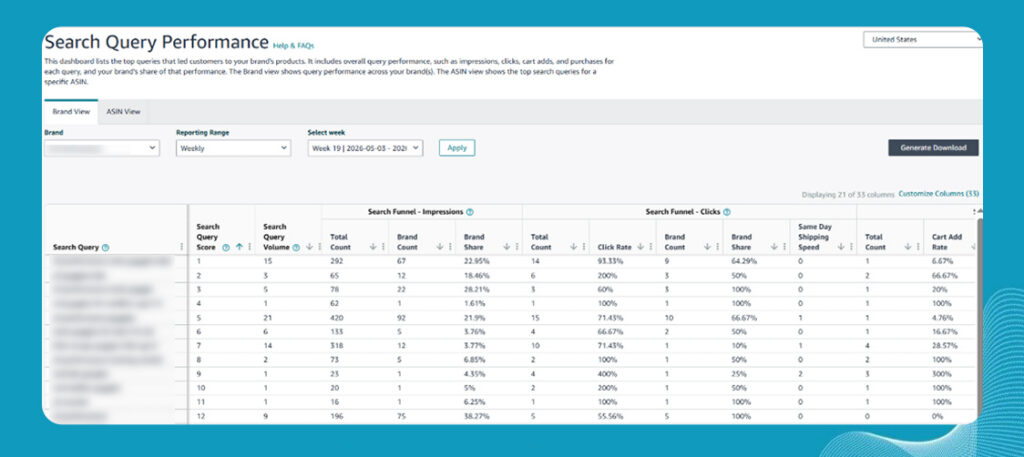
Download three months of data. Calculate the trend. A declining CVR over time despite stable traffic is a red flag that competition has intensified or your listing has aged out of relevance.
The 5 Data Points to Check Before Your Listing
Before making any changes, record these five numbers:
- Unit Session Percentage (CVR): your baseline
- Sessions: total traffic volume (too low means a traffic problem, not a conversion problem)
- Buy Box percentage: if below 90%, pricing or fulfillment is stealing conversions
- Average star rating: below 4.0 kills conversions across all categories
- Return rate: a high return rate signals product-expectation mismatch, which no amount of listing optimization will fix.
2. Optimize Amazon Keywords for Buyer Intent
Most sellers confuse search volume with buyer intent. A keyword with 80,000 monthly searches may produce terrible conversions if the searchers are in research mode rather than purchase mode. Amazon listing keyword optimization is only valuable when you target keywords that attract buyers, not browsers.
Find Keywords That Attract Buyers
Buyer-intent keywords share common characteristics: they are specific, they include product attributes (size, material, use case), and they often mirror the language a person uses when they have already decided to buy.
Compare these two keyword clusters:
- “coffee mug”: informational, broad, low intent
- “20oz insulated stainless steel travel mug with leak-proof lid”: specific, attribute-rich, purchase intent
Use these sources to build a buyer-intent keyword list:
- Amazon’s “Customers also bought” and “Customers also viewed”: reveals what shoppers consider alongside your product
- Search Query Performance report: shows which queries actually produced purchases (not just clicks) for your ASINs
- Competitor review mining: read the reviews of top competitors and note the exact language buyers use to describe the product and their use case. Those phrases belong in your listing.
- Amazon auto-suggest: type your main keyword and capture every auto-complete variation; these are real queries with volume
Structure Your Amazon Title Correctly
Amazon’s title is the highest-weighted keyword field in the algorithm, and it is the first thing a buyer reads. Stuffing it with disconnected keywords destroys CVR even if it briefly improves impressions.
A title formula that balances both:
[Brand] + [Primary Keyword] + [Key Attribute 1] + [Key Attribute 2] + [Use Case or Benefit] + [Size/Count/Variant if relevant]
Example: BrewCore Insulated Travel Mug | 20oz Stainless Steel, Leak-Proof Lid, BPA-Free | Hot 12 Hours, Cold 24 Hours
This title contains the primary keyword, three buyer-intent attributes, a key benefit, and reads like a sentence a human would write, not a keyword dump.
Keep titles under 200 characters. Amazon truncates in search results at roughly 115 characters on desktop, so front-load the most critical keyword and benefit.
Place Keywords Strategically
Amazon indexes keywords from multiple fields with different weights:
- Title: Highest weight. Put your primary keyword and top 2–3 attributes here.
- Bullet points: High weight. Use natural language. Include secondary and long-tail keywords here.
- Product description / A+ Content: Moderate weight. Write for buyers, not the algorithm, this content is read by humans who are close to purchasing.
- Backend search terms: Supplemental. Use this field for misspellings, alternate terms, Spanish-language variations (if relevant), and keywords that did not fit naturally in the visible content. Do not repeat what is already in the title or bullets, redundancy wastes backend space.
- Subject matter fields and intended use: Often ignored, but indexed. Fill these out completely..
3. Optimize Main Image and Visual Stack
Buyers make a decision in under three seconds on a search results page. Your main image either earns the click or loses it. Once they land on your listing, the image gallery either builds enough confidence to purchase or sends them back to search results. No other element of your listing has more impact on CVR than your visual stack.
Optimize the Main Image for Clicks and Conversions
Amazon’s technical requirements for the main image are: pure white background (RGB 255/255/255), product fills at least 85% of the frame, no text or graphics, no watermarks. These are rules, not strategies.
What actually drives clicks and conversions in the main image:
- Product angle that shows the most compelling attribute: for a mug, that is the lid mechanism and the size, not a straight-on shot
- Props that imply scale: a mug next to a hand or desk item communicates size instantly
- Clarity over creativity: highly stylized or artistic main images almost always lose to clean, well-lit product-forward shots in A/B tests
- Fill the frame: a product that looks small in the main image suggests low value at a glance
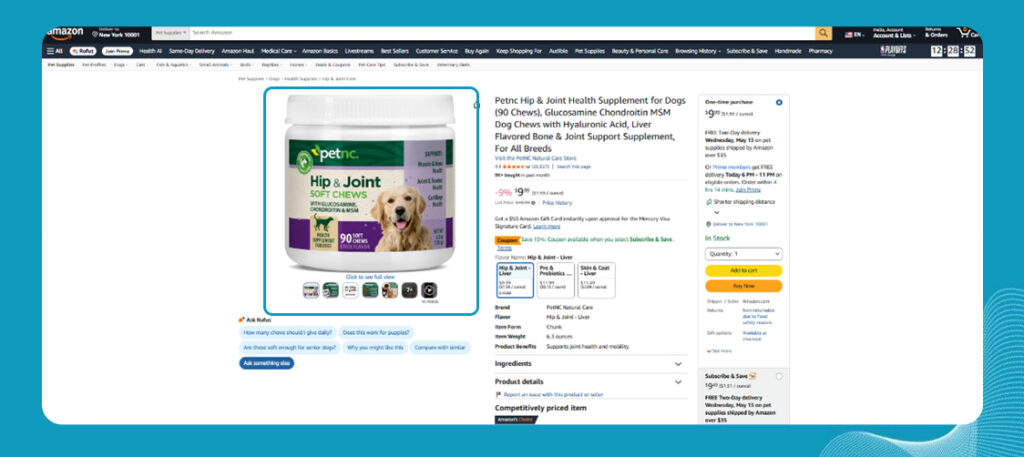
The single most impactful improvement most sellers can make is investing in a professional photography retake of the main image with a focus on maximum product size, optimal angle, and clinical white balance.
Use Manage Your Experiments for Image Testing
Amazon’s Manage Your Experiments (MYE) tool lets brand-registered sellers run statistically valid A/B tests on titles, main images, A+ Content, and bullet points. This is the only legitimate way to know whether an image change actually improves CVR, gut feel is unreliable.
How to run a main image test:
- Go to Seller Central → Brands → Manage Experiments
- Select “Create Experiment” and choose “Main Image”
- Upload your challenger image (Version B)
- Set a 4–8 week test duration (shorter tests rarely reach statistical significance)
- Amazon splits traffic 50/50 and declares a winner when the confidence threshold is met
Run one experiment at a time per ASIN. Simultaneous changes make it impossible to attribute results.
Build a 7-Image Conversion Framework
Your image gallery is a silent salesperson. Each image should answer a specific buyer question:
- Main image: What is this product? (Clean, white background, product-forward)
- Scale and context: How big is it? Where does it fit in my life?
- Key feature close-up: What makes this better than alternatives? (Lid mechanism, material texture, joinery quality)
- Lifestyle in use: Can I see myself using this?
- Benefit infographic: What specific problem does this solve? (Hot 12 hours, cold 24 hours, leak-tested to X PSI)
- Comparison or specification: How does it compare to the competition or a generic option?
- Social proof visual: A star rating callout, press mention, or “over 50,000 sold” badge if you have earned it
This sequence moves a buyer from awareness through consideration to trust, in seven images.
Use Product Videos to Improve CVR
Product videos consistently improve CVR in categories where buyers have questions that images cannot answer: assembly products, apparel fit and fabric, tools, kitchen gadgets, and anything with a mechanism. A 60–90 second video demonstrating the product in real use addresses objections before they form.
For simple products (a plain notebook, a standard USB cable), video impact on CVR is marginal. Prioritize video investment for products where the primary buyer objection is “does this actually work the way it looks?”
4. Write Listing Copy That Converts Buyers
A buyer who reaches your bullet points is already interested. They clicked the listing, they are looking at your images, and now they want to know: is this actually right for me? Your bullets are where you answer that question, or lose the sale to uncertainty.
Structure Bullet Points Around Buyer Psychology
Most sellers write bullets as a features checklist. High-converting bullets are organized around buyer psychology: they match the emotional and functional questions a buyer has at the moment of decision.
Those questions, in order, are typically:
- Will this solve my specific problem?
- Is the quality reliable enough to justify the price?
- Is the size, fit, or spec right for my situation?
- What happens if it does not work out? (Returns, warranty)
- Is there proof that other people like me bought this and were satisfied?
Structure your five bullets to answer these questions in order, and you will outperform a feature list every time.
Lead With Benefits Instead of Features
The most common bullet point mistake is leading with the feature and burying the benefit. Buyers do not care about what a product has, they care about what it does for them.
- Feature-first (weaker): “Double-wall vacuum insulation technology keeps beverages at temperature for extended periods.”
- Benefit-first (stronger): “Your coffee stays hot for 12 hours and your iced drink stays cold for 24, so your commute, your workout, and your full workday are covered with one mug.”
The second version makes the benefit viscerally real. It mentions a specific use case (“commute, workout, full workday”) that triggers recognition, the buyer sees their own life in the description.
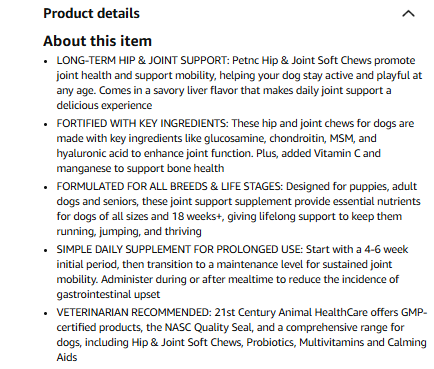
Lead every bullet with the benefit in capital letters (Amazon convention), then support it with the feature that delivers that benefit.
Use A+ Content Over Basic Description
A+ Content (formerly Enhanced Brand Content) replaces the basic product description for brand-registered sellers. It allows image-text modules, comparison charts, brand story sections, and richer formatting.
A+ Content meaningfully improves CVR when:
- Your product requires explanation (how it works, how it compares, why it costs more)
- You sell in a competitive category where your competitors already have A+
- Your product has a brand story that differentiates it from white-label alternatives
A+ Content has negligible CVR impact when:
- The product is a commodity with no differentiation
- Your images already answer every buyer question
- Your basic description was already excellent
If you are going to invest in A+, the comparison module is the highest-converting element, it lets buyers see at a glance why your product outperforms alternatives on the attributes they care about.
5. Include Pricing, Promotions, and Social Proof
A buyer can like your product images, understand your copy, and still refuse to purchase if the pricing feels off or the listing lacks trust signals. Pricing and social proof are the final conversion filters between product interest and completed orders.
Most Amazon sellers treat pricing, coupons, and reviews as separate optimization tasks. In reality, buyers evaluate all three simultaneously. A listing with weak reviews needs stronger pricing leverage. A premium-priced product needs stronger differentiation. A heavily discounted product with poor ratings creates distrust instead of urgency.
This is why high-converting Amazon listings do not optimize these elements independently. They position them together.
Build a Competitive Pricing Strategy
Pricing on Amazon is not about being the cheapest seller in the category. It is about being priced correctly relative to perceived value.
A product priced too low often signals low quality. A product priced too high without visible differentiation loses conversions to competitors with stronger social proof or better positioning.
The goal is to find the pricing range where buyers feel the product offers strong value without questioning quality.
How to Find Your Optimal Price Point
Start by identifying the top 5–8 competing products in your category based on:
- Best Seller Rank (BSR)
- Review count
- Star rating
- Main image quality
- Feature positioning
Then compare your product against those competitors from a buyer’s perspective.
If your listing has:
- fewer reviews,
- weaker branding,
- or lower perceived authority,
…you usually need a modest pricing advantage to remain competitive.
A practical approach is:
- price 5–10% below equivalent competitors during early growth stages,
- then move toward price parity once review count and conversion stability improve.
Premium pricing only works when buyers clearly understand why the product deserves it. That differentiation must appear immediately in:
- images,
- product positioning,
- feature communication,
- and review quality.
Otherwise, higher pricing simply increases abandonment.
Use Promotions Strategically
Coupons and promotions can improve conversion rates when used intentionally. But when overused, they damage pricing credibility and train buyers to wait for discounts.
Many sellers mistakenly rely on perpetual discounts to compensate for weak positioning. That usually creates long-term margin problems instead of sustainable growth.
Amazon coupons work particularly well in two situations:
1. Product Launches
New ASINs with limited reviews often need additional buyer incentives to reduce purchase hesitation. A visible coupon badge helps offset trust gaps during the early review-building phase.
2. Rank and Velocity Campaigns
Short-term promotional pushes can temporarily improve:
- click-through rate,
- conversion rate,
- and sales velocity,
…which may help improve organic ranking during competitive periods.
Seasonal events, inventory pushes, and Prime-related campaigns are also appropriate use cases. In most categories, a 10–15% coupon creates enough perceived value without damaging long-term pricing expectations.
Strengthen Social Proof
Reviews are one of the strongest conversion drivers on Amazon because buyers trust previous customer experiences more than brand claims.
Even an excellent listing struggles to convert if buyers see limited or weak review signals.
The objective is not simply getting more reviews. The objective is building trustworthy review momentum that supports purchase confidence.
The safest review-generation methods include:
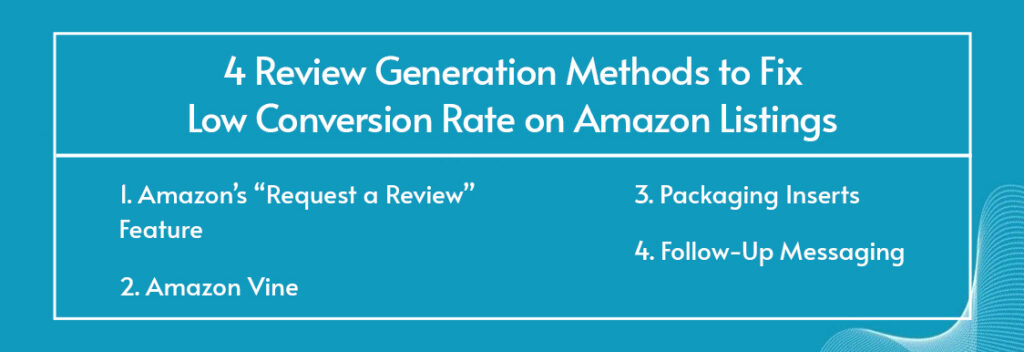
- Amazon’s “Request a Review” Feature: This sends Amazon-standardized review requests directly through Seller Central and remains the safest compliant method.
- Amazon Vine: For new ASINs with limited reviews, Vine helps establish early social proof through verified reviewer participation.Even mixed reviews convert better than zero reviews because buyers prefer transparency over uncertainty.
- Packaging Inserts: Insert cards can direct buyers to warranty registration, provide setup instructions, or offer customer support access.
- Follow-Up Messaging: Buyer-Seller Messaging sequences can ask customers about their experience as long as they remain neutral and compliant with Amazon policy.
Optimize Review Quality Signals
Not all star ratings impact conversion equally. Amazon buyers evaluate review scores psychologically, not mathematically. Small rating shifts can create disproportionately large conversion changes.
- Below 3.5 Stars: Conversion rates usually collapse below this threshold. Most buyers immediately lose trust regardless of pricing or advertising quality. At this stage, the issue is rarely the listing itself. The product experience, fulfillment quality, or customer expectations likely require correction.
- 3.5–3.9 Stars: This range creates noticeable buyer hesitation, especially when competing listings maintain ratings above 4.0. Conversion rates remain heavily discounted versus stronger competitors.
- 4.0–4.2 Stars: This is generally considered acceptable within most Amazon categories. The listing can compete effectively if positioning is strong, pricing is reasonable, and reviews appear authentic.
- 4.3–4.5 Stars: This is typically the optimal conversion range. Buyers perceive these ratings as trustworthy, realistic, and consistently positive.
- 4.8–5.0 Stars With Low Review Counts: Extremely high ratings paired with very few reviews can actually reduce trust. Many buyers associate near-perfect ratings on low-volume listings with manipulation or insufficient purchase history.
Manage Negative Reviews Professionally
Negative reviews are not always conversion killers. Poor responses to negative reviews are.
Future buyers often read critical reviews specifically to evaluate:
- how brands handle problems,
- whether issues were resolved,
- and whether the seller appears trustworthy.
A defensive or dismissive response usually reinforces buyer concerns. A professional response can rebuild trust even after a negative experience. Effective public review responses typically follow three steps:
1. Acknowledge the Customer Experience
Avoid defensiveness. Buyers want accountability first.
Example:
“We’re sorry the product did not meet your expectations.”
2. Explain Corrective Action
Show buyers the issue is being addressed.
Example:
“We have already updated the packaging design to prevent this issue moving forward.”
3. Offer Direct Resolution
Provide a clear support path.
Example:
“Please contact our support team directly so we can resolve this immediately.”
This approach signals:
- accountability,
- operational improvement,
- and customer support reliability.
All three improve buyer trust for future customers reading the review section.
On Amazon, buyers do not expect perfection. They expect professionalism, responsiveness, and confidence that problems will be handled properly after purchase.
Conclusion
Improving Amazon conversion rate is not about making random listing changes or simply increasing ad spend. It is about building a listing experience that aligns buyer intent, positioning, pricing, visuals, and trust signals into one cohesive purchase journey. When those elements work together, conversion improves naturally, and Amazon’s algorithm responds with stronger organic visibility and more efficient traffic.
The brands that consistently outperform their category are not necessarily the ones spending the most on advertising. They are the ones continuously refining how their listings communicate value, build trust, and remove buyer hesitation at every stage of the decision-making process.
At Prime Retail Solution, we help brands approach Amazon conversion optimization strategically, not reactively. As a reliable exclusive 3P partner, we offer reliable 3P services which focus on building high-converting listings that strengthen organic performance, improve advertising efficiency, and support sustainable long-term growth on Amazon.
Book a free consultation call now.
Share