The Real Reason Your Amazon Listings Aren't Converting
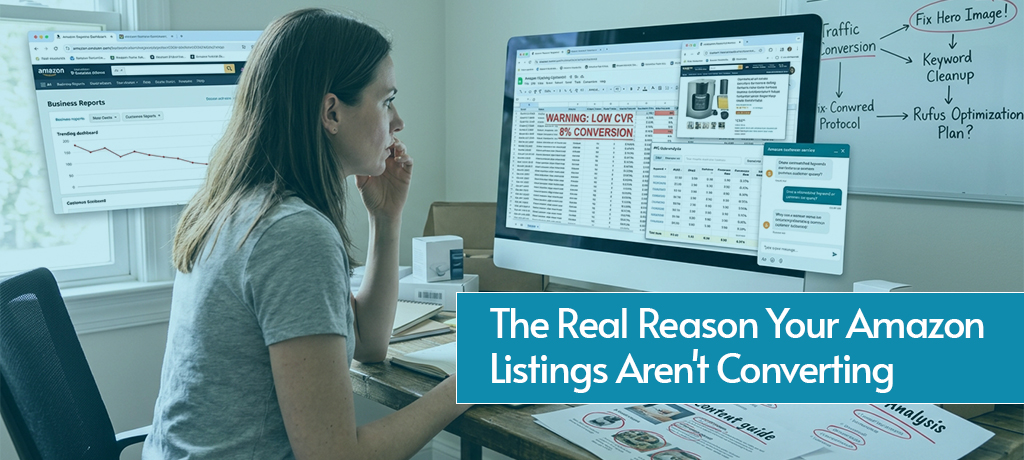
Find out why your Amazon listings aren’t converting and learn how to fix weak copy, images, keywords, pricing, reviews, and other conversion barriers.
You're getting impressions. You're running ads. Shoppers are landing on your listing. And then nothing. No sale, no Add to Cart, no revenue. Just a click that cost you money and produced nothing in return.
This is one of the most frustrating positions to be in as an Amazon seller, and it's far more common than most people talk about. When Amazon listings aren't converting, the instinct is usually to throw more ad budget at the problem or drop the price and hope that moves units. Sometimes that works. More often, it doesn't, because the real problem sits somewhere else entirely in the listing itself, in who's seeing it, or in what happens when a shopper lands on it.
Understanding why your Amazon listings aren't converting requires a different kind of thinking. Instead of asking "how do I get more traffic," the better question is: "what is happening between the click and the abandoned page?" The answer to that question is almost always fixable, but only if you diagnose the right root cause first.
This guide breaks down every major reason Amazon listings are not converting, how to identify which one is affecting your listing specifically, and what to do about it.
What Is a Good Amazon Conversion Rate?
Before investigating why your Amazon listing is not converting, it helps to know what "converting" actually looks like by the numbers. Amazon calculates conversion rate as the percentage of sessions that result in a purchase; in other words, how many of the shoppers who view your listing actually buy.
| Conversion Rate | What It Means |
|---|---|
| 0–5% | Danger zone: serious listing or targeting issues |
| 6–9% | Below averageoptimization needed |
| 10–14% | Healthy listing is working reasonably well |
| 15%+ | Excellent focus on scaling traffic |
The Amazon marketplace average sits around 10–15%, but this varies meaningfully by category. Consumables and everyday essentials tend to convert higher because shoppers arrive with strong purchase intent. Electronics, premium products, and categories with higher research requirements typically convert lower because buyers spend more time comparing options before committing.
You can find your conversion rate in Seller Central under Business Reports → Detail Page Sales and Traffic by ASIN. Look at the Sessions and Units Ordered columns, then divide units ordered by sessions and multiply by 100. If you're running PPC, cross-reference this with your ad conversion rate to see whether paid and organic traffic convert at different rates; a significant gap between the two often reveals a targeting issue.
First, Diagnose the Real Problem: Traffic vs. Conversion
When Amazon listings aren't converting, most sellers immediately start editing bullet points or tweaking their price. Sometimes that's the right move. But not always, because there are actually two fundamentally different problems that look identical from the outside.
Problem Type 1: A traffic problem. Shoppers aren't finding your listing, or they're finding it but not clicking through to the detail page. Your impression count is low, your click-through rate is weak, and your sessions are below where they need to be. In this scenario, editing your bullet points won't help because the problem happens before a shopper ever reads them.
Problem Type 2: A conversion problem. Shoppers are finding and clicking your listing, but they're leaving without buying. Your session count looks reasonable, but your conversion rate is low. This is a persuasion problem: something on the detail page is failing to convince shoppers to add to cart.
| Signal | Likely Problem | Where to Focus |
|---|---|---|
| Low impressions, low clicks | Traffic/discoverability | Keywords, main image, PPC targeting |
| Good impressions, low CTR | Click-through | Main image, title, price |
| Good CTR, low conversion | On-page persuasion | Bullets, images, reviews, pricing, A+ Content |
| Good traffic, low overall sales | Combined | Full listing audit needed |
Identifying which type of problem you're dealing with first narrows the fix significantly and prevents you from wasting time optimizing the wrong part of your listing.
Reason 1: Your Main Image Isn't Stopping the Scroll
If you're wondering why your Amazon listing is not converting and your click-through rate is the weak link, the main image is almost always the culprit. On Amazon, the main image is the first and sometimes only thing a shopper evaluates before deciding whether to click or keep scrolling. It appears in search results, in sponsored placements, and in recommendation widgets, often at a small size where detail gets lost fast.
What a weak main image looks like. Low resolution that blurs when zoomed. A product that's small in the frame relative to competitors. A background that isn't a clean white. Props, text overlays, or lifestyle elements that aren't permitted in the main image slot. Or simply a generic photo that looks identical to twenty other listings on the page.
What a strong main image does. It fills the frame with the product so it appears larger than competitors in the same search grid. It's shot at an angle that communicates the product's key selling point at a glance. It's high enough resolution to reward zooming. And it creates enough visual distinction that a shopper's eye pauses on it rather than scrolling past.
How to fix it. Invest in professional product photography if you haven't already. Test alternative hero image angles using Amazon Experiments (available through Brand Registry) to identify which version actually drives more clicks with real traffic data rather than guesswork. Study the main images of the top three organic results in your category; what they're doing that stops the scroll is what you should be replicating or improving on.
Reason 2: Your Title and Keywords Are Attracting the Wrong Shoppers
A title that ranks for the wrong keywords is one of the most common and least obvious reasons why Amazon listings aren't converting. It creates a specific pattern: decent session volume, very low conversion rate, and no clear explanation in the listing itself for why shoppers aren't buying. The listing looks fine. The problem is who's arriving at it.
The mismatch problem. When your title is over-indexed for broad, high-volume keywords that don't match your product's actual use case, Amazon sends you traffic from shoppers who were never going to buy your specific product. Those sessions inflate your traffic numbers while tanking your conversion rate, and because Amazon's algorithm tracks which keywords your listing converts on, repeated non-conversions on a search term signal that your listing is irrelevant to that term, which eventually drops your ranking for it.
What poor keyword targeting looks like in practice. A supplement brand optimizing for a very broad category term like "protein powder" when their product is specifically a plant-based protein for women over 40. The broad term drives volume, but most of those shoppers are looking for something different. The brand's conversion rate suffers, and their more specific, high-intent search terms get less visibility as a result.
How to fix it. Pull your Search Term Report from Seller Central and sort by clicks with zero or near-zero conversions. These are the terms bleeding your budget without producing sales. Negate them in your PPC campaigns and consider whether they belong in your listing content at all. Replace them with more specific, intent-matched keywords that describe your product accurately. A lower search volume term that converts at 20% outperforms a high-volume term that converts at 1% in every metric that matters.
Reason 3: Your Bullet Points and Description Aren't Closing the Sale
If shoppers are landing on your listing and leaving without buying, and your images are strong, the next place to audit is your copy. Your bullet points and description are your sales team; they need to do the work of answering objections, communicating value, and giving the shopper the confidence to buy, all without any human interaction.
What weak listing copy looks like. Bullet points that list specifications without connecting them to benefits. Descriptions that read like they were written for a search engine rather than a person. Generic language that could apply to any competing product. Missing information that leaves the shopper with unanswered questions. And perhaps most commonly, bullet points that lead with features ("Stainless steel construction") instead of the benefit that feature delivers ("Holds temperature for 24 hours so your coffee stays hot through your entire workday").
The structure of a high-converting bullet. Lead with the benefit in capital letters or a short bolded phrase, then support it with the feature or proof point that delivers that benefit. Address the top concern for each primary buyer persona. Answer the questions a skeptical shopper would ask before committing. And use the fifth bullet to handle the most common objection in the category, whether that's durability, size, compatibility, or something else your reviews reveal shoppers worry about.
A+ Content and its impact on conversion. Listings with A+ Content consistently convert at higher rates than those without it, particularly in competitive categories where shoppers are comparing multiple options. A+ Content gives you space below the fold to tell your brand story, visually compare variants, address FAQs, and showcase your product in use. For Brand Registry-enrolled sellers, leaving A+ Content unused is one of the most straightforward conversion improvements available.
How to fix it. Read your one- and two-star reviews carefully. Every repeated complaint or unanswered question in a negative review is a conversion leak in your listing, a concern that shoppers had and that your listing didn't address before they bought. Rewrite your bullets to pre-emptively answer those concerns, and use your A+ Content to deepen the story your bullets establish.
Reason 4: Your Price Isn't Competitive Enough to Convert
Price is one of the most immediate conversion signals on Amazon. Shoppers compare prices across multiple listings simultaneously, and a price that feels out of step with the competition creates hesitation that most listings don't recover from. If you've been wondering why your Amazon listings aren't converting despite strong images and good copy, price is one of the fastest variables to test.
Price vs. perceived value. The issue isn't always that you're priced too high in absolute terms; it's often that your listing hasn't built enough perceived value to justify the price relative to what's around it. A $39 product sitting next to a $24 product with 3,000 more reviews needs to communicate clearly why the premium is worth it. If the listing doesn't make that case, the cheaper option wins by default.
Using promotions strategically. Amazon coupons, lightning deals, and temporary price reductions can provide a meaningful conversion lift, particularly for listings in the early stages of building review count. A coupon badge visible in search results improves click-through rate as well as conversion rate, since it signals value before the shopper even arrives at the detail page. These aren't permanent fixes; they're tactical tools to generate the velocity that builds long-term momentum.
How to fix it. Check the price of the top three to five converting competitors in your category. If you're priced above the median without an obvious differentiation advantage visible in the first three seconds of the listing, test a price reduction and measure the impact on conversion rate over the following two weeks. Price elasticity varies by category, but for most products, a 10–15% reduction can produce a disproportionately large conversion improvement.
Reason 5: You Don't Have Enough Reviews (or the Right Ones)
Reviews are the most powerful trust signal on Amazon, and their impact on conversion rate is difficult to overstate. Most shoppers won't seriously consider a product with fewer than 15 reviews or an average rating below 4 stars, and in competitive categories, the threshold is often much higher. If your Amazon listings are not converting and your review count is low, this is likely a significant contributing factor.
The review volume problem. A listing with 8 reviews sitting next to one with 800 reviews faces an uphill conversion battle regardless of how good the product or the listing is. Social proof is persuasive in direct proportion to how much of it exists, and on Amazon, shoppers interpret low review counts as a signal that not enough people have bought the product to confirm it's worth buying.
The review quality problem. A high review count with a 3.8 average rating converts worse than a lower review count with a 4.5 average. And recent reviews matter: a product with 200 reviews, most of which are two or three years old, raises questions about whether the current product quality matches what earlier buyers experienced. Recency signals to shoppers that the product is actively selling and that the current version has been validated.
How to fix it. Use Amazon's Request a Review button in Seller Central, which sends an Amazon-standard review request to every buyer automatically and compliantly. Enroll eligible ASINs in Amazon Vine to generate early, credible reviews from verified reviewers. Monitor review sentiment regularly; a pattern of complaints about a specific issue is a product problem that needs to be fixed at the source, not managed with responses alone.
Reason 6: Shoppers Don't Trust Your Listing
Even with good images and competitive pricing, some listings fail to convert because they don't feel trustworthy enough for shoppers to feel confident clicking Add to Cart. Trust is built from multiple signals working together, and a listing that's missing several of them creates friction that erodes the purchase decision.
Missing or thin A+ Content. A listing without A+ Content has a noticeably shorter detail page compared to competitors that have invested in it. That visual thinness signals that the brand hasn't put serious effort into their Amazon presence, and for a shopper making a purchase decision, it raises subtle doubt about whether the brand is legitimate and the product well-made.
No Amazon Storefront. Brands with a built-out Amazon Storefront signal permanence and professionalism in a way that generic seller accounts don't. Shoppers who click on a brand name and arrive at a well-designed storefront with multiple products are more likely to complete a purchase than those who arrive at an empty or incomplete brand page.
Weak or absent social proof beyond reviews. Verified purchase badges, answered questions in the Q&A section, and seller feedback scores all contribute to the trust architecture of a listing. A Q&A section with no answered questions, or one with unanswered negative questions, creates uncertainty at a critical moment in the shopper's decision process.
Fulfillment and delivery trust signals. Prime eligibility and fast delivery timelines are among the strongest conversion signals on Amazon. FBA-fulfilled listings consistently outconvert FBM-fulfilled listings in the same category, partly because Prime shipping is a recognized trust badge and partly because shoppers have been trained to expect fast, reliable delivery from Prime-eligible products. If your listing isn't Prime-eligible and your competitors' are, that difference alone can explain a meaningful portion of your conversion gap.
How to fix it. Complete your A+ Content, build out your Storefront, answer every question in your Q&A section proactively, and enroll in FBA if you haven't already. Each of these individually provides a marginal lift; together, they create a listing that feels like a legitimate, established brand rather than a new seller taking a chance.
Reason 7: Your Listing Isn't Optimized for Amazon's AI
This is the reason most sellers haven't heard about yet, and increasingly, it's one of the reasons Amazon listings are not converting even when everything else looks right. Amazon's AI shopping assistant, Rufus, is now embedded in the shopping experience and actively influences purchase decisions before many shoppers click on a listing at all.
How Rufus affects conversions. When a shopper asks Rufus to compare products, recommend the best option in a category, or explain the differences between two listings, Rufus pulls structured data directly from your product detail page to formulate its response. If your listing lacks the specific, structured information Rufus needs- exact material composition, compatibility specs, intended use case, warranty details, precise dimensions- Rufus either recommends a competitor whose listing provides that clarity, or generates a vague, unconvincing summary of your product.
The zero-click problem. In some cases, Rufus gives shoppers enough information to make a purchase decision without ever clicking on your listing. If Rufus can confidently recommend a competitor based on their clearer listing data, your product gets dismissed before you even get an impression. This is a newer phenomenon, but it's already affecting conversion patterns for listings in information-dense categories like electronics, supplements, and home improvement.
How to fix it. Audit your listing for gaps in structured data: are your dimensions complete and accurate? Is your material composition stated explicitly? Is your compatibility information (if applicable) listed in the product attributes, not just buried in the description? Do your bullet points use precise, specific language that answers the questions a comparison-shopping AI would pull from? Listings that are engineered for both human readers and machine parsing outperform those optimized only for one or the other.
How to Use PPC Data to Diagnose Conversion Problems
One of the most underused tools for diagnosing why your Amazon listings aren't converting is already inside your Seller Central account: your PPC campaign data. If you're running ads, you're generating conversion data on dozens or hundreds of search terms simultaneously, and that data reveals exactly where your listing is losing shoppers.
What the data tells you.
| PPC Signal | What It Indicates | Where to Look |
|---|---|---|
| High CTR + low conversion rate | Listing isn't convincing once shoppers arrive | Images, bullets, reviews, pricing |
| High spend + near-zero sales | Wrong audience or serious listing problem | Keyword targeting, search term report |
| Strong conversion on some terms, weak on others | Certain audiences convert better | Identify top-converting terms, optimize for that intent |
| Good conversion rate on exact match, poor on broad | Broad terms attracting wrong intent | Negate non-converting broad terms |
Using Search Term Reports as a listing audit tool. Sort your Search Term Report by clicks descending, then look at the conversion rate for each term. Terms with high clicks and low conversion are telling you something important: either those shoppers have different intent than your product serves, or something in the listing is failing to convert those specific shoppers. The pattern across multiple terms often points to a single root cause: a pricing issue, a review problem, or a specific buyer concern that the listing isn't addressing.
Running PPC to generate diagnostic data deliberately. If you don't have enough organic traffic to draw conclusions, run a broad auto campaign specifically to surface search term data. The goal isn't profitable sales at this stage; it's conversion data that reveals which search contexts your listing converts in and which it doesn't. That information is worth far more than the cost of the campaign.
A Listing Conversion Audit Checklist
Use this checklist to systematically identify where your listing is leaking conversions. Any box you can't check confidently is a fix worth prioritizing.
Images
- Main image is high-resolution, fills the frame, and the product is clearly visible on a white background
- Secondary images include lifestyle shots, infographics, scale reference, and feature highlights
- Image set tells a complete story without requiring the shopper to read the copy
Title
- Primary keyword appears naturally in the first 80 characters
- Title communicates the most important product attribute (size, material, use case) at a glance
- Title is readable, not keyword-stuffed or truncated in mobile search results
Bullet Points
- Each bullet leads with a benefit, supported by a feature or proof point
- Top 1–2 buyer concerns or objections are addressed explicitly
- No generic filler language that could apply to any product in the category
Pricing
- Price is within 10–15% of the category median for comparable products
- A coupon, deal, or bundle is active if conversion rate is below 10%
Reviews
- Minimum 15+ reviews with a 4.0+ average rating
- Request a Review is enabled for all orders
- No unanswered patterns of complaints that haven't been addressed in the listing
Trust and Credibility
- A+ Content is live and uses comparison modules and lifestyle visuals
- Brand Storefront is complete and professionally designed
- Q&A section has proactive answers to the most common category questions
- Listing is FBA-fulfilled and Prime-eligible
Keywords and Targeting
- Backend search terms are fully populated with non-duplicated, relevant keywords
- Search Term Report has been reviewed and non-converting broad terms negated
- Primary keywords are confirmed converting in PPC before being prioritized in listing content
AI Readiness
- All product attributes are complete in the listing backend (dimensions, materials, compatibility, warranty)
- Bullet points use specific, structured language rather than general marketing claims
- Listing passes the Rufus test: if an AI were asked to compare this product to a competitor, does your listing provide enough specific information to win the comparison?
Conclusion
When your Amazon listings aren't converting, the solution is almost never as simple as running more ads or dropping your price. The real cause is somewhere in the system: a main image that isn't compelling enough to earn the click, keywords that are delivering the wrong audience, copy that doesn't answer the right questions, reviews that don't yet build enough trust, or a listing that isn't structured to survive Amazon's AI comparison layer.
The good news is that every one of these problems is fixable. A methodical audit, starting with the traffic-vs.-conversion diagnostic and working through each element of the listing systematically, will almost always reveal the specific weak point that's costing you sales. And fixing the right thing, rather than the most obvious thing, is what produces real, durable conversion improvement.
If you’ve worked through this checklist and your Amazon listings still aren’t converting the way they should, the problem may go beyond the listing itself. Your positioning, pricing, keyword strategy, or advertising could be limiting performance. Prime Retail Solution helps brands identify these gaps and turn underperforming listings into stronger conversion drivers through a data-driven Amazon Listing SEO strategy.
FAQs
What is a good conversion rate for Amazon listings?
A healthy Amazon conversion rate sits between 10% and 15% for most categories. Anything below 8% is a sign that the listing needs attention. Above 15% is excellent and signals that the focus should shift to increasing traffic rather than optimizing conversion further.
How do I find my Amazon listing's conversion rate?
Go to Seller Central → Business Reports → Detail Page Sales and Traffic by ASIN. Divide Units Ordered by Sessions and multiply by 100 to get your conversion rate percentage.
Why is my Amazon listing not converting even though I'm getting traffic?
This is a classic conversion problem rather than a traffic problem. The most common causes are weak secondary images that don't build purchase confidence, pricing that isn't competitive relative to the top alternatives, a review count or rating that's too low to generate trust, or listing copy that fails to address the shopper's key concerns before they leave.
Can lowering my price alone fix my conversion rate?
Sometimes, but not reliably. Price is one factor in a conversion system. If your images are weak, your reviews are thin, or your copy doesn't answer the shopper's questions, lowering the price may generate a short-term lift without fixing the underlying problem. Address the root cause first, then use pricing as a conversion lever.
How many reviews do I need before my listing starts converting well?
Most sellers see a meaningful conversion improvement once they reach 15–25 reviews with a 4.0+ average. In competitive categories, 50–100 reviews may be necessary to compete credibly with established listings. The quality and recency of reviews matter as much as the volume.
What is Rufus, and why does it affect my conversion rate?
Rufus is Amazon's AI shopping assistant that helps shoppers compare and evaluate products through conversational queries. It pulls structured data from your product detail page to form its recommendations. If your listing lacks specific, structured informationexact specs, compatibility, materials, use caseRufus may recommend a competitor with clearer data, costing you a sale before you ever got an impression.
How often should I audit my listing for conversion issues?
At minimum, once per quarter for stable, performing listings. Monthly for newer listings or any ASIN where conversion rate has dropped more than two to three percentage points from its previous average. Any significant competitive change in the categorynew entrants, price shifts, review surgesis also a trigger for an unscheduled audit.
More from
the brief.
A Comprehensive Guide to Selling On The Walmart Marketplace
The online marketplace has expanded rapidly in recent years, providing opportunities for business owners all around the globe to start selling on Walmart.
Read article →
Amazon FBA vs FBM: Full Comparison Guide
There are 2 main selling methods on Amazon – Fulfillment by Amazon, and Fulfillment by Merchant. Choosing between FBA and is one of the most critical strategic decisions you'll make as an Amazon sell…
Read article →
Brands: Amazon 1P Vs. 3P And Who To Choose?
You may have pondered whether the 1P or 3P model is better for your brand's sales, whether you're a seasoned Amazon seller or just getting your feet wet. We at Prime Retail Solution, a 3P seller with…
Read article →Ready to talk
operations?
Tell us about your marketplace footprint. We'll respond within one business day.
Laguna Beach, CA 92651