Why Is My Amazon Listing Suppressed and How to Fix It?
An Amazon suppressed listing can badly affect your sales without shutting your ASIN down completely. Your product still exists in Seller Central, inventory may be available, and ads may even be runni…
An Amazon suppressed listing can badly affect your sales without shutting your ASIN down completely. Your product still exists in Seller Central, inventory may be available, and ads may even be running, but customers can’t find your listing in Amazon search. This creates a dangerous situation where sellers experience unexpected revenue loss and the ad spend keeps wasting on the listings which are not even visible.
In this guide, you’ll learn what an Amazon suppressed listing is, why Amazon suppresses listings, how to fix Amazon listing suppression step-by-step, and how to prevent it from happening again.
What is Amazon Suppressed Listing Meaning?
Amazon Suppressed Listing Meaning:
An Amazon suppressed listing is an active ASIN that is hidden from Amazon search results because it does not meet Amazon’s listing, category, pricing, policy, or quality requirements. In simple terms, Amazon allows the ASIN to exist, but removes it from discovery.
Suppressed vs Inactive vs Stranded Listings
Amazon sellers often confuse the terms like suppressed listings, inactive listings, and stranded listings. The table below will help you understand the key difference among them:
| Listing Type | Core Status | Key Distinction |
|---|---|---|
| Suppressed Amazon Listing | Active | Listing exists but is not searchable on Amazon |
| Inactive Listing | Inactive | Listing is not available for sale by seller choice or system action |
| Stranded Listing | Active | Listing has no inventory attached, so it cannot sell |
A suppressed Amazon listing is especially harmful because sellers often assume everything is fine while traffic drops to zero.
Why Is Amazon Listing Suppressed?
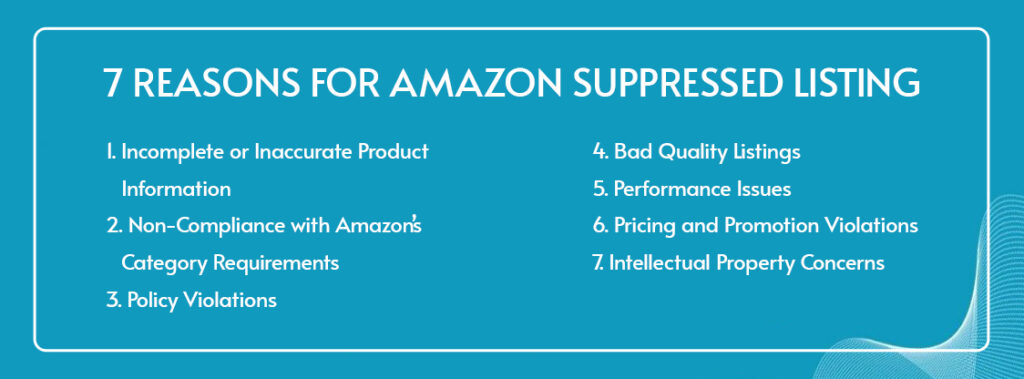
Amazon listing suppression occurs when an ASIN fails one or more of Amazon’s enforcement checks. Below are the most common reasons sellers encounter Amazon suppressed listings.
1. Incomplete or Inaccurate Product Information
One of the most frequent reasons an Amazon listing is suppressed is missing or incorrect required information. Amazon has made it necessary to provide specific data in your listings such as brand name, product type, size, color, and bullet points. Any missing details can badly affect the visibility of your listings.
2. Non-Compliance with Amazon’s Category Requirements
Each category has unique listing requirements, and failure to comply can trigger Amazon listing suppressed status. This often happens when sellers select an incorrect category, omit category-specific instructions, or fail to provide required compliance information.
3. Policy Violations
Another reason behind suppressed Amazon listings is policy violation. If your listings mention prohibited claims, restricted keywords, or misleading statements, Amazon’s automated systems suppress them. Health, performance, and outcome-based claims are especially risky.
4. Bad Quality Listings
Amazon prioritizes customer experience, and if your listings are low quality, they’ll be suppressed. In order to avoid suppression, you must not do excessive keyword stuffing, write unclear titles, format poorly, and use low-quality images.
5. Performance Issues
In some cases, Amazon suppressed listings are tied to ASIN-level performance rather than content. High order defect rates, frequent returns, or repeated customer complaints can also lead to Amazon listing suppression.
6. Pricing and Promotion Violations
Pricing inconsistencies are another common cause. If Amazon detects price parity issues, extreme price fluctuations, or misleading discounts, the listing may be suppressed.
7. Intellectual Property Concerns
If you are using unauthorized brand references, trademark misuse, copyrighted images, or duplicate content, your listing will fall into the Amazon suppression list soon.
What Does a Suppressed Listing Look Like?
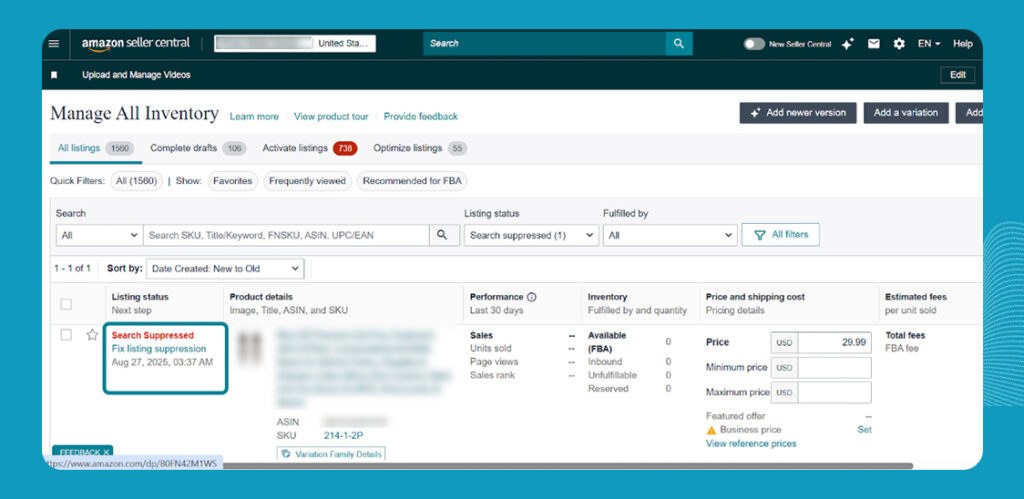
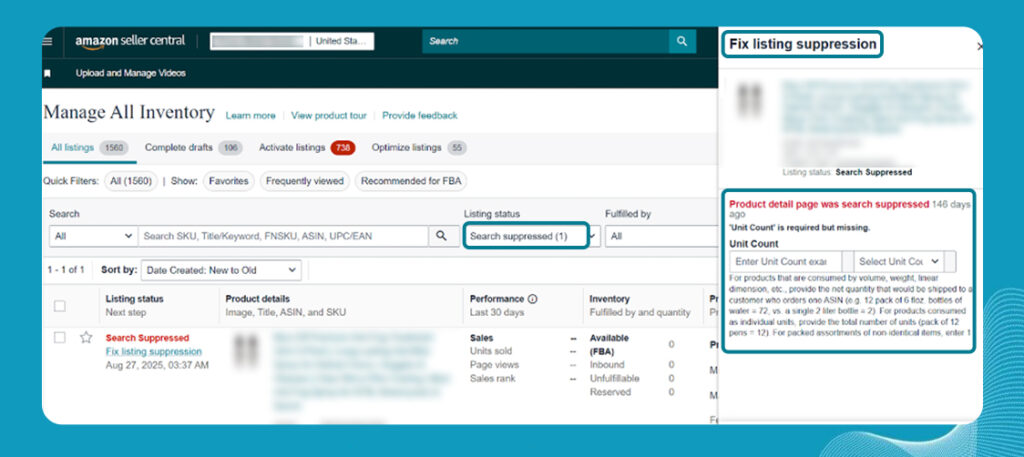
A suppressed Amazon listing typically appears active in Seller Central but does not show up in Amazon search results. Sellers may see warnings such as “Search Suppressed” or alerts indicating missing information. From a customer’s perspective, the product is effectively invisible.
This creates confusion, as sellers often ask why inventory is available, ads are running, or the ASIN appears active, yet no sales occur. In nearly all cases, this behavior signals an Amazon listing search suppressed issue.
How to Fix Amazon Suppressed Listing: Step-by-Step Guide
Here’s a 10 steps guide to do Amazon listing suppression fix:
1. Review Suppression Reasons
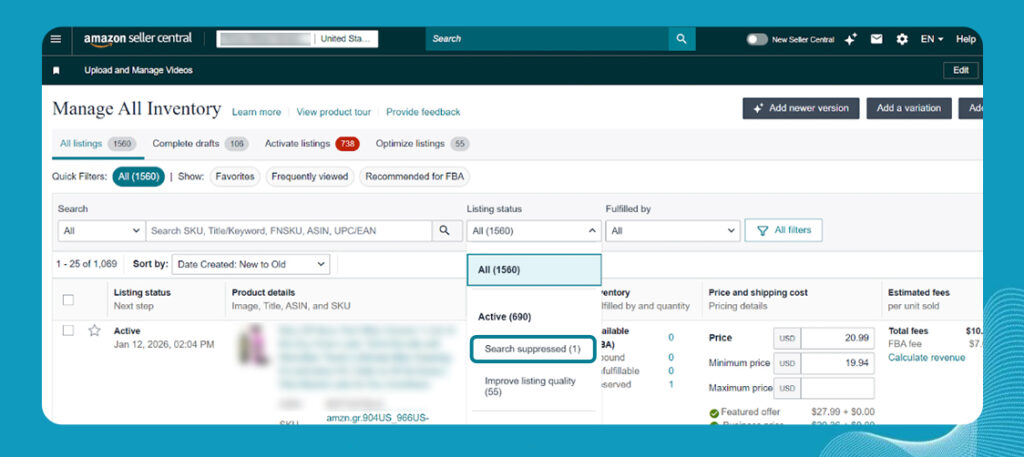
In Seller Central, go to “Manage All Inventory” and filter by “Suppressed.” Open the warning message to identify why the Amazon suppressed listing was triggered.
2. Update Missing Information
Review the listing editor and complete all required attributes such as brand, product type, size, and variations. Make sure backend fields match the live product detail page to avoid further suppression.
3. Verify Compliance with Category Requirements
Check the category style guide to confirm your ASIN meets all category-specific requirements. Missing category information or incorrect placement commonly cause Amazon listing suppressed issues.
4. Ensure Policy Compliance
Audit your title, bullets, and description for restricted claims or prohibited language. Align all content strictly with Amazon policies to remove Amazon suppressed listing restrictions.
5. Optimize Product Titles and Descriptions
Rewrite titles to be clear, factual, and compliant with Amazon’s formatting rules. Descriptions should be customer-focused and informative without keyword stuffing.
6. Improve Listing Images
Confirm images meet Amazon’s resolution and content guidelines. Remove excessive text overlays or misleading visuals that may trigger suppression.
7. Address Performance Metrics
Review customer feedback, returns, and complaints tied to the ASIN. Resolve recurring issues to improve performance and restore listing visibility.
8. Check Intellectual Property Compliance
Verify that all brand references, images, and text are authorized and original. Unauthorized use can quickly place the ASIN on the Amazon suppression list.
9. Pricing and Shipping Compliance
Ensure pricing follows Amazon’s fair pricing and parity policies. Confirm shipping timelines and delivery promises are accurate and consistent.
10. Submit for Re-evaluation
After correcting all issues, allow Amazon time to reprocess the listing automatically. Most Amazon suppressed listings are reinstated within 24–72 hours.
How to Prevent Listing Suppression in the Future
1. Follow Amazon Listing and Category Guidelines Strictly
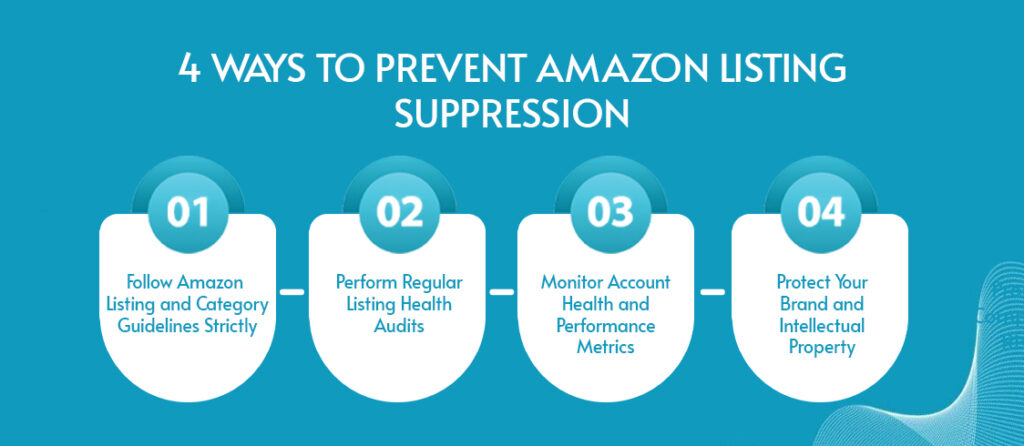
Prevention starts with compliance. Sellers should regularly review Amazon’s listing and category guidelines and avoid assumptions, especially when launching new ASINs or editing existing ones.
2. Perform Regular Listing Health Audits
Routine listing audits help identify risks before suppression occurs. Reviewing attributes, images, and content monthly keeps listings off the Amazon suppression list.
3. Monitor Account Health and Performance Metrics
Tracking ASIN-level performance metrics allows sellers to correct issues early. Performance-based Amazon suppressed listings are often preventable with proactive monitoring.
4. Protect Your Brand and Intellectual Property
Using Brand Registry, monitoring IP issues, and maintaining original content protects listings from unnecessary suppression and long-term visibility loss.
Wrapping Up
An Amazon suppressed listing is not a minor issue, it is a complete visibility shutdown. Because the ASIN remains active, many sellers lose weeks of revenue before realizing what happened. By understanding why Amazon listings are suppressed, applying a structured Amazon listing suppression fix, and implementing preventive controls, sellers can protect both sales and account stability. If you want your inventory to be micro-managed to avoid such kinds of issues, Prime Retail Solution is your go-to place. Book a free consultation call now.
FAQs
1. What is Amazon suppressed listing?
An Amazon suppressed listing is an active ASIN that does not appear in search results because it does not meet Amazon’s listing, category, policy, pricing, or quality requirements.
2. Why is my Amazon listing suppressed?
An Amazon listing suppressed status usually occurs due to missing product information, category non-compliance, policy violations, poor listing quality, pricing issues, or intellectual property concerns.
3. How can I tell if my Amazon listing is search suppressed?
If your ASIN shows as active in Seller Central but does not appear in search results, it is likely an Amazon listing search suppressed and may display a warning such as “Search Suppressed.”
4. How do I fix an Amazon suppressed listing?
An Amazon listing suppression fix involves identifying the suppression reason in Seller Central, correcting missing or non-compliant information, and allowing Amazon to reprocess the listing.
5. Are suppressed Amazon listings the same as inactive or stranded listings?
No. Suppressed Amazon listings are active but hidden from search, inactive listings cannot be sold, and stranded listings have no inventory attached and appear separately from the Amazon suppression list.
Ready to talk
operations?
Tell us about your marketplace footprint. We'll respond within one business day.
Laguna Beach, CA 92651